
hp laptop keyboard repair in patna
HP Laptop Keyboard Not Working – Causes, Fixes and Repair Guide
HP laptops are widely used for office work, study, and personal tasks because of their performance and durability. However, like any electronic device, they can sometimes develop technical problems. One of the most common issues users face is HP laptop keyboard not working. When the keyboard stops responding or some keys stop functioning, it can seriously affect productivity and daily work.
If you are facing this issue, there is no need to panic. In many cases, the problem can be fixed with a few simple troubleshooting steps. In other situations, the keyboard may need professional repair or replacement. If you live in Bihar, professional services like hp laptop keyboard repair in patna can help diagnose and fix hardware-related keyboard issues quickly.
In this article, we will discuss the common reasons why an HP laptop keyboard stops working, possible solutions you can try at home, and when it is best to consult a professional technician.
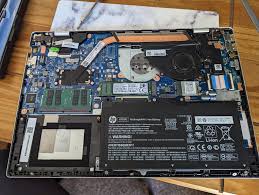
Common Reasons Why HP Laptop Keyboard Stops Working
Keyboard problems can happen for several reasons. Sometimes it is related to software settings, while in other cases the issue may be due to hardware damage.
1. Outdated or Corrupted Keyboard Drivers
Drivers allow the operating system to communicate with hardware components such as the keyboard. If the keyboard driver becomes outdated, missing, or corrupted, the keyboard may stop responding properly. Updating or reinstalling the keyboard driver often resolves this issue.
2. Dust or Debris Under the Keys
Over time, dust particles, crumbs, or other small debris can accumulate under the keyboard keys. This can block the keys from functioning properly or cause them to stop working completely.
3. Accidental Keyboard Lock
Sometimes users unknowingly activate keyboard lock settings or certain function key combinations that disable parts of the keyboard. Checking keyboard settings and function keys can sometimes solve the issue quickly.
4. Liquid Damage
Spilling water, tea, coffee, or any liquid on the laptop keyboard can damage the internal circuits. Liquid damage is one of the most common causes of keyboard failure and usually requires professional repair. In such cases, many users look for hp laptop keyboard repair in patna to get the issue fixed by experienced technicians.
5. Hardware Failure
After long-term use, laptop keyboards may experience wear and tear. Some keys may stop working, or the entire keyboard may fail. If the keyboard hardware itself is damaged, replacement may be necessary.
Simple Fixes for HP Laptop Keyboard Not Working
Before visiting a repair center, you can try a few troubleshooting steps that may fix the problem.
1. Restart Your Laptop
A system restart can fix temporary glitches in the operating system that may affect keyboard functionality.
2. Check External Keyboard
Connect an external USB keyboard to your laptop. If the external keyboard works normally, the issue is likely with the internal keyboard hardware.
3. Update Keyboard Drivers
Open Device Manager, find the keyboard driver, and update it. If necessary, uninstall the driver and restart the laptop so the system can reinstall it automatically.
4. Clean the Keyboard
Use compressed air or a soft brush to remove dust and debris from between the keys. This can sometimes restore the functionality of stuck keys.
5. Run Windows Troubleshooter
Windows has a built-in troubleshooter that can detect and resolve hardware-related issues, including keyboard problems.
If these methods do not solve the problem, the keyboard may need professional repair or replacement. At that point, visiting a technician who provides hp laptop keyboard repair in patna can be a practical solution.
When You Should Consider Professional Repair
While some keyboard issues can be fixed with simple troubleshooting, certain problems require professional assistance.
You should consider repair services if:
-
Multiple keys are not working
-
The entire keyboard has stopped responding
-
Keys are stuck or typing incorrect characters
-
The keyboard stopped working after liquid damage
Opening the laptop without proper tools and experience can cause additional damage. Professional technicians have the right equipment to safely repair or replace the keyboard. Many laptop users prefer hp laptop keyboard repair in patna services because experienced technicians can quickly diagnose the issue and provide a reliable solution.
HP Laptop Keyboard Repair Cost
The cost of repairing an HP laptop keyboard depends on the type of issue and the laptop model.
Typical repair costs may include:
-
Minor software troubleshooting: ₹300 – ₹500
-
Keyboard cleaning service: ₹300 – ₹700
-
Keyboard replacement: ₹900 – ₹2500
The exact price usually depends on the laptop model and the availability of spare parts. Reliable technicians offering hp laptop keyboard repair in patna can inspect your device and give you an accurate repair estimate.
FAQ – HP Laptop Keyboard Problems
1. Why is my HP laptop keyboard not working?
Your keyboard may stop working due to driver issues, dust under the keys, accidental keyboard lock, or hardware damage.
2. Can I fix my HP laptop keyboard at home?
Yes, you can try simple fixes such as restarting the laptop, updating drivers, cleaning the keyboard, or running the Windows troubleshooter.
3. How do I know if my laptop keyboard is damaged?
If multiple keys stop working, keys type incorrect characters, or the keyboard stops responding completely, it may indicate hardware damage.
4. How long does HP laptop keyboard repair take?
In many cases, keyboard repair or replacement can be completed within one to two hours, depending on the issue and the laptop model.
5. Where can I repair my HP laptop keyboard in Patna?
If you are located in Bihar, you can look for trusted technicians offering hp laptop keyboard repair in patna to get professional and reliable repair services.
Conclusion
A non-working HP laptop keyboard can interrupt your work and make it difficult to use your device effectively. Fortunately, many keyboard issues can be fixed with simple troubleshooting methods such as updating drivers, cleaning the keyboard, or checking system settings.
However, if the problem is related to hardware damage or liquid exposure, professional repair is usually required. Choosing a reliable technician ensures that your laptop keyboard is repaired safely and efficiently. For users living in Bihar, services such as hp laptop keyboard repair in patna can provide expert repair and help restore your laptop to proper working condition.